![HC360 Logo_White.png]](https://www.healthcheck360.com/hs-fs/hubfs/1.%20Marketing/HealthCheck360%20Brand/HC360%20Logo_White.png?height=40&name=HC360%20Logo_White.png)
Access Meal Tracking
-
Log into your myHC360+ account
- Select the "+" icon.
- Choose Nutrition to open the nutrition tracking feature
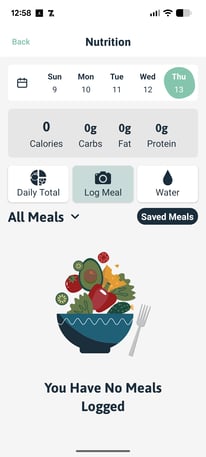
*Screenshot from our app
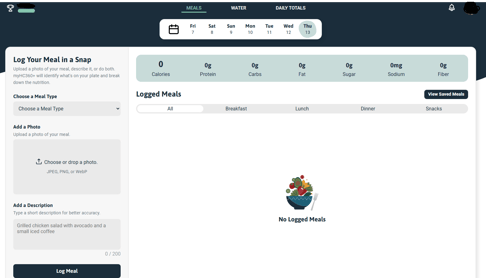
*Screenshot from the online portal my.hc360.app
From the nutrition screen, you can track your water, see your daily total, and log a meal.
Select Log Meal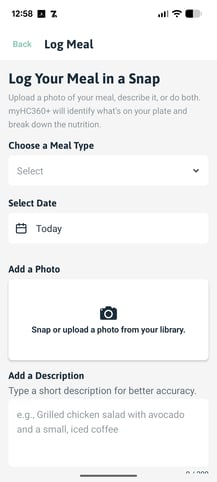
- Choose a Meal Type (Breakfast, Lunch, Dinner, or Snack).
- Select the date if you are tracking for another day
- Upload a photo of your meal and our AI feature will analyze it for you
- OR, you can skip the camera and Add a Description
- Enter a description of what you ate, the amount, and any information the system should have to ensure better accuracy.
- Select Log My Meal at the bottom.
Review the submission and make changes by selecting the various items. You can also delete a submission by selecting the trash icon in the upper right hand corner. You can also favorite a meal by selecting the banner icon.
Once you are satisfied, select Save Changes.
Tips for better results
- Add details such as ingredients, brand names, or preparation method to help improve the estimate.
- Make sure meal photos are well lit and clearly show the food.
- Add extra details for mixed dishes or homemade meals.
- Save favorite meals for faster one-tap logging next time.
- Check Daily Totals, Weekly Trends, and macro insights to see patterns over time.
- Nutrition details are estimates, so review and adjust your entry when needed.